
Espresso Pro
Ask the BaristaPro
Describe what you’re looking for in your own words, in about 100 languages. Dates, sizes and places become filters; the rest is found by meaning, on your Mac.
Pro · Ask the Barista needs Espresso Pro, a Mac with Apple silicon and macOS 15 or later.
Click ✨ Ask in the toolbar, press ⌘J, or start the search with ?.
Then describe what you’re after, in English, Italian or any of about 100 languages:
- “the lease contract”
- “photos from the wedding in june 2019”
- “PDF delle bollette più grandi di 2 MB”
- “le foto dei cani al mare dell’estate scorsa”
Results appear as you type, best matches first.
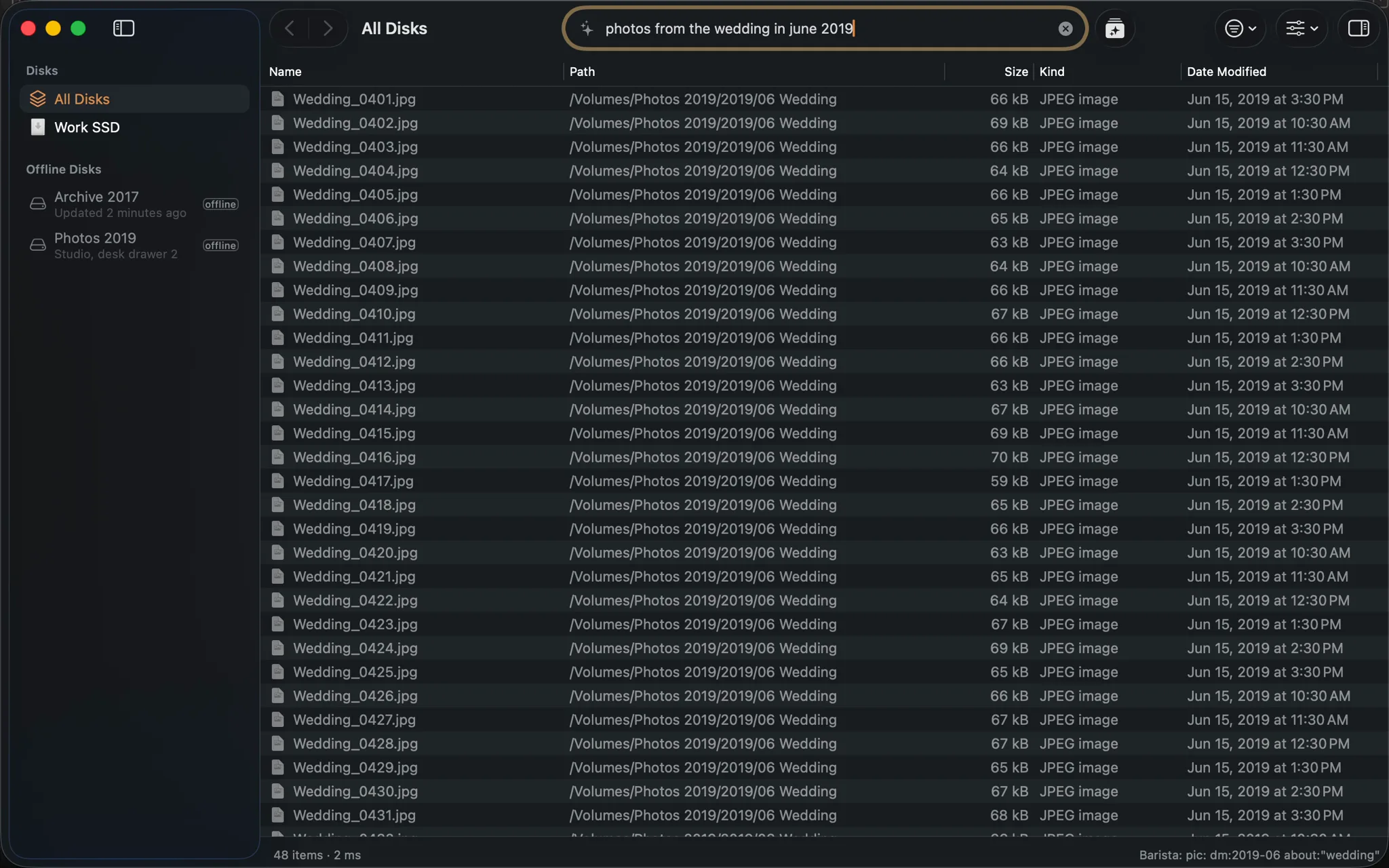
pic: dm:2019-06 about:"wedding".What the barista understands
What can be said exactly becomes a filter:
- kinds: photos, videos, PDFs, songs…
- dates: “last summer”, “negli ultimi 3 giorni”, and for photos and videos when they were taken
- sizes: “bigger than 2 MB”
- places and disks: “on the desktop”, “sulla scrivania”, a disk’s name
- the details Espresso read: the camera (“photos taken on a Canon”, “video girati col drone”), the flash, star ratings (“almeno 4 stelle”), frame rate (“60 fps”, “slow motion”), focal length (“col 50mm”, “grandangolo”), high ISO, music genres and decades (“canzoni jazz degli anni 80”)
The rest is found by meaning: “contratto d’affitto” finds Lease agreement.pdf, and
“bollette” finds a PDF called 2022-06.pdf whose text is an electricity bill.
The status bar shows what your question became, for example Barista: pic: dm:2026-06..2026-08 about:“cani al mare”. Press Esc to keep that search in the field and adjust it by hand.
Setting it up
The first time, Espresso asks before downloading the barista’s model: Google’s EmbeddingGemma 2, 585 MB, once. It runs on your Mac’s Neural Engine, in about 5 ms a question.
Then the barista learns your disks in the background, a few minutes each, offline disks included, and its answers get better as it goes. It learns names, the text Espresso read inside documents and, if you turn on Understand photos in Settings › Search › Ask the Barista, what photos show. System folders, app data and software projects are skipped.
You can Remove the model, and everything it learned, in the same place.
about: in any search
about: searches by meaning anywhere in a search, and combines with every filter:
ext:pdf about:"rental contract"
pic: about:tramonto
ext:pdf dm:lastyear about:tasse
A name containing every word of the topic also counts, and so do the files inside a folder about
it. Without the model, about: matches names that contain the topic’s words.
Works better with Inside files
With Inside files on, the barista understands documents by their text and photos
by what they show, not only by their names. The two work independently: Inside files finds exact
words (content:affitto), the barista finds meaning (“contratto di locazione”).
Your questions stay on your Mac
The model runs on your Mac. Your questions, and what it learns about your files (stored next to the index), never leave it. The only connection is the one-time download of the model from Hugging Face, when you ask for it. See Privacy.